
Stop printing, scanning, and entering test results by hand.
Potaflow replaces your Excel spreadsheets and filing cabinets with a digital review queue, compliance dashboard, and device registry, built for NYS cross connection programs.
Built for Nassau County cross connection programs · Free trial
Sound familiar?
If you're running a cross connection program, you've probably dealt with all of this.
Tests arrive three different ways
Email, fax, and mail three inboxes to monitor. Forms get lost, delayed, or never arrive. You only find out when a device goes overdue.
Every submission is manual work
Print the email. Enter the test date into Excel. Scan the form as a PDF. Attach it to a customer account. Repeat for every single submission.
No real-time compliance picture
Your compliance rate lives in a spreadsheet that's only as current as the last time someone updated it. Year-end audits mean counting rows.
Rejected forms are a phone call
When a form has missing data or an expired license, you call the tester, explain the problem, wait for a corrected copy, and re-enter it. Every rejection doubles the work.
How Potaflow works for your district.
From submission to compliance tracking automated.
- 1
Testers submit digitally
DOH-1013 forms arrive in your review queue already validated every required field filled, tester license verified, test kit checked. No more illegible handwriting, missing data, or lost faxes. You're notified the moment a new submission arrives.
No more paper intake - 2
Review with confidence
Open a submission and see the tester's license status, test kit validity, and certification details displayed inline. Accept with one click, or reject with structured notes that go back to the tester automatically, they correct and resubmit without a phone call.
Tester credentials verified inline - 3
Compliance updates automatically
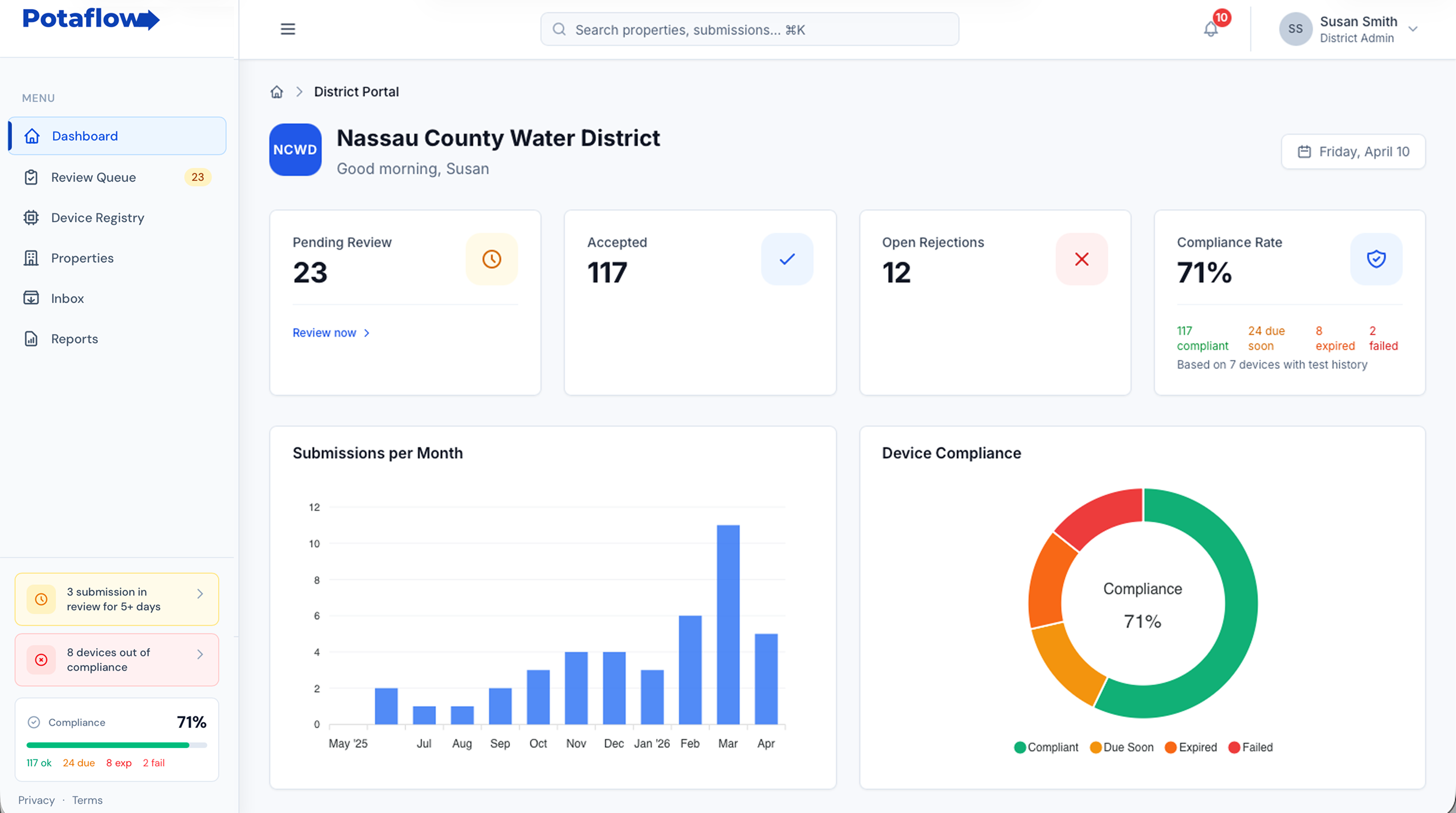
Every accepted test updates your compliance dashboard in real time. See which devices are tested, due soon, overdue, or failed without touching a spreadsheet. Your compliance rate is always current.
No manual data entry - 4
Everything in one place
Submissions, devices, properties, documents, reports all searchable, all exportable. Your cross connection program runs from one screen instead of three inboxes and a spreadsheet.
One system, not five
Bring your existing device inventory into Potaflow in minutes.
Whether you have 1000 devices or 10,000 - upload your spreadsheet and you're live.
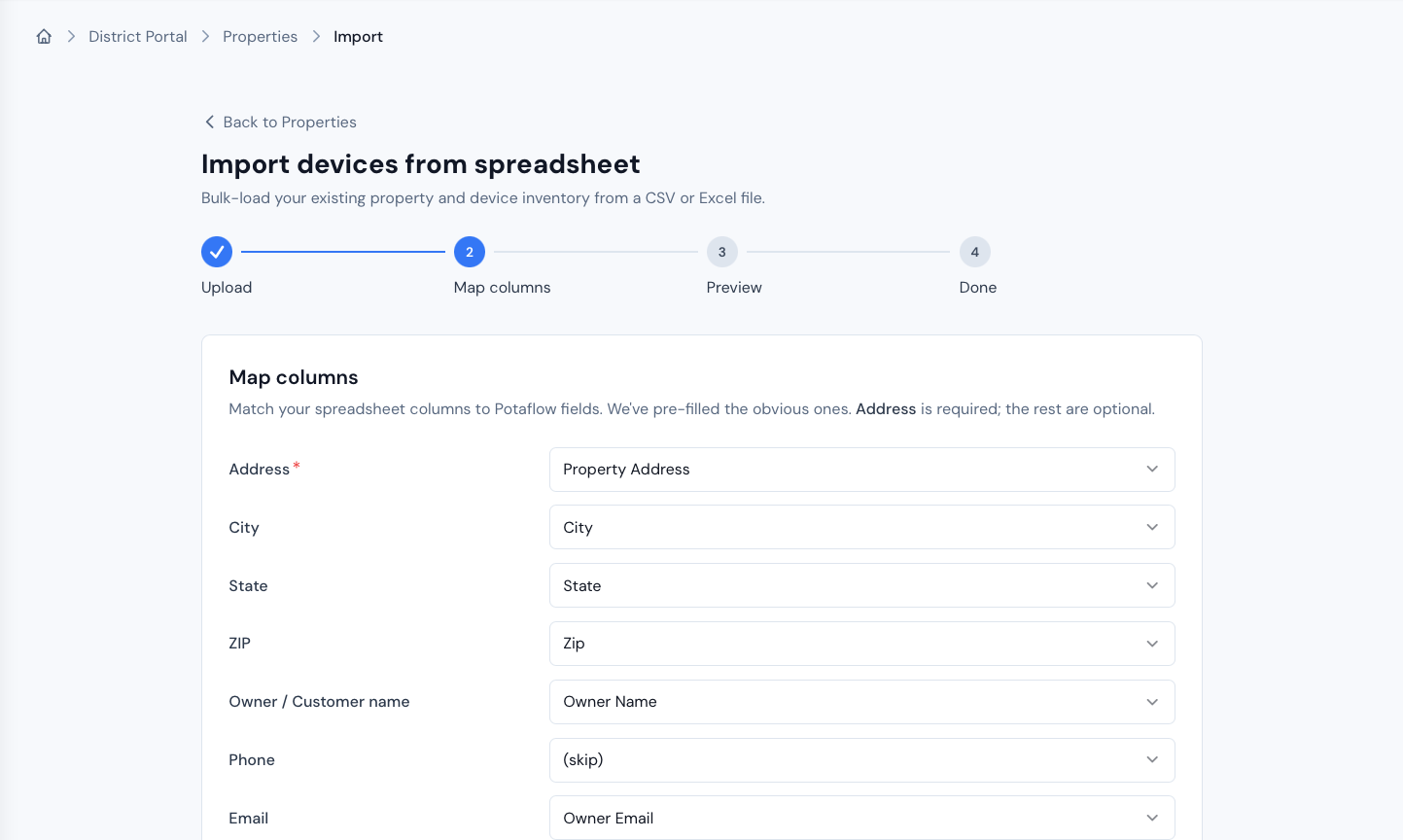
Upload any spreadsheet
CSV or Excel. Potaflow reads your file and auto-detects your column layout. No reformatting required. Your columns, your data, mapped automatically.
Smart duplicate handling
Re-import your updated spreadsheet anytime. Potaflow matches existing records by account number or address and updates only what's changed. No duplicates, no data loss.
PVB and AVB auto-classified
Devices that don't require DOH-1013 testing are automatically flagged as non-testable on import. They appear in your inventory but don't inflate your compliance metrics.
Failed rows aren't lost
If any rows can't be imported (missing address, bad date format), Potaflow tells you which ones and why, so you can download the error log and fix them in your spreadsheet.
Everything your cross connection program needs.
Built specifically for NYS water districts managing backflow device compliance.
Review Queue
Search, filter, and review DOH-1013 submissions. Reviewer locks prevent duplicate reviews. Rejections include structured notes that route back to testers automatically. Correction chains link original and corrected submissions.
Compliance Dashboard
Real-time compliance rate, device status breakdown, and 12-month submission trends updated automatically as forms are accepted. Sidebar widget shows expiring-this-week alerts so nothing slips through.
Device Registry
Unified view of your imported inventory and tester-submitted devices. See compliance status per device, link submissions to your records, and mark devices as non-testable when they don't require annual testing.
Property Management
Track properties by address, account number, and meter number. Attach notes and files to any property. Linked devices and full test history on every property detail page.
Bulk Import
Upload your CSV or Excel device inventory. Columns auto-detected, duplicates handled on re-import, compliance data preserved. PVB/AVB devices auto-flagged as non-testable.
Document Inbox
Receive license copies, calibration certificates, repair reports, and other documents from testers not just DOH-1013 forms. Acknowledge receipt with one click. Replies route back to the tester automatically.
Reports & CSV Export
Device compliance report and submission history report both filterable, both exportable as CSV. Pull the data you need for audits, board meetings, or your own records.
Role-Based Access
Three roles, Admin (full access + settings + user management), Clerk (review submissions + manage properties), and Read-only. Clerks can be scoped to residential or commercial properties only.
Supplemental Forms
Require testers to submit additional certifications alongside their DOH-1013 like Rain Gauge / Moisture Sensor Certification. Toggle per district in your settings.
In-App Notifications
Get notified when new submissions arrive, scoped by reviewer type. Residential clerks see residential submissions; commercial clerks see commercial. Admins see everything.
Works Everywhere
Desktop, tablet, or phone. Potaflow is a web app, no software to install. Installable as a PWA for quick access from your home screen.
Vetted Gauge & Tester Certification
Every submission is backed by a verified NYS DOH backflow license and a current gauge calibration certificate on file. Expired licenses and out-of-date calibrations are flagged before a form ever reaches your review queue.
Already delivering to you
On the list. Not yet on the platform.
Potaflow already delivers DOH-1013 submissions by email to these 29 Nassau County districts. If yours is among them, you're processing our forms manually today, onboard onto the portal to turn that inbox into a structured review queue.
Don't see your district on the list? Contact us, we'll add it to our delivery routes today. Get in touch →
Questions district administrators ask.
Straight answers about how Potaflow works for your program.
How do testers submit to us through Potaflow?
What about testers who don't use Potaflow yet?
Can I import my existing device inventory?
How much does it cost?
How long does setup take?
What roles can I set up for my staff?
Can testers send us documents other than DOH-1013 forms?
Does Potaflow replace our existing village software?
What happens during annual testing season?
Is our data secure?
See how Potaflow works for your district.
Schedule a 30-minute walkthrough. We'll use your real data to show you exactly how your program would work on Potaflow. Free for 90 days, no commitment.
Or email us directly at contact@potaflow.com
- No software to install
- Import your existing data
- Free trial
Are you a backflow tester? See how Potaflow works for testers →